Project Setup and Troubleshooting
First add vaudio.dll as a dependency to your project, as well as helpers to copy the license file, dependencies and resource folder to the output directory:
<Project Sdk="Microsoft.NET.Sdk">
    <PropertyGroup>
        <OutputType>Exe</OutputType>
        <TargetFramework>net8.0</TargetFramework>
    </PropertyGroup>

	<PropertyGroup>
    	<!-- Replace this with the path to your vaudio SDK -->
		<VAudioDir>path\to\your\vaudio\folder</VAudioDir>
    </PropertyGroup>

    <!-- Add vaudio.dll to your project -->
    <ItemGroup>
    	<Reference Include="vaudio">
    		<HintPath>$(VAudioDir)\vaudio.dll</HintPath>
    	</Reference>
    </ItemGroup>

    <Target Name="PostBuild" AfterTargets="PostBuildEvent">
    	<!-- Copy the license file to the build directory -->
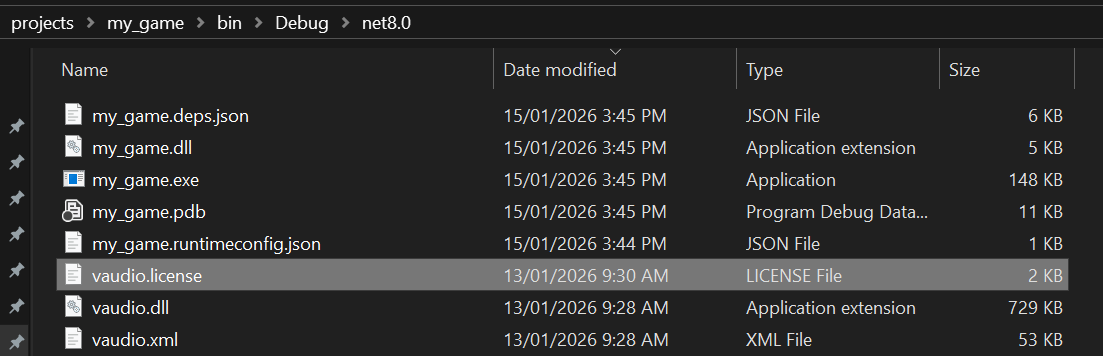
    	<Copy SourceFiles="$(VAudioDir)\vaudio.license" DestinationFolder="$(OutDir)" />

    	<!-- Copy dependencies to the build directory -->
    	<Copy SourceFiles="$(VAudioDir)\glfw3.dll" DestinationFolder="$(OutDir)" />

    	<!-- Copy native dependencies to the project directory -->
    	<Copy SourceFiles="$(VAudioDir)\libSkiaSharp.dll" DestinationFolder="$(ProjectDir)" />
    	<Copy SourceFiles="$(VAudioDir)\libHarfBuzzSharp.dll" DestinationFolder="$(ProjectDir)" />

    	<!-- Copy the resource folder to the build directory -->
    	<ItemGroup>
    		<ResourceFiles Include="$(VAudioDir)\resource\**\*.*" />
    	</ItemGroup>

    	<Copy SourceFiles="@(ResourceFiles)" DestinationFolder="$(OutDir)\resource\%(RecursiveDir)" />

    	<!-- GODOT ONLY: copy the resource folder to project directory -->
    	<Copy SourceFiles="@(ResourceFiles)" DestinationFolder="$(ProjectDir)\resource\%(RecursiveDir)" />
    </Target>
</Project>
Then create a RaytracingContext and run the project:
static void Main(string[] args)
{
    var context = new vaudio.RaytracingContext()
    {
        WorldSize = new(100),
        RenderingEnabled = true,
    }

    while (true)
    {
        context.Update();
        System.Threading.Thread.Sleep(16);
    }
}
The first time you run this, you will likely face some errors. Below is a list of solutions for each error.
License Error
When running the project, this error may occur:
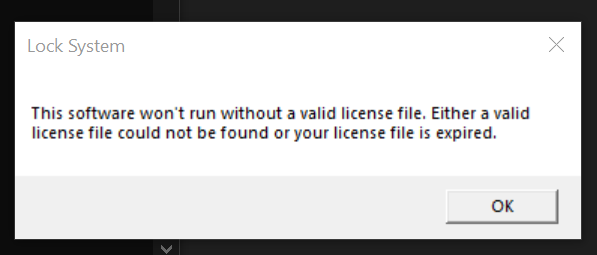
To solve this, ensure the vaudio.license file is copied to your build directory:
Startup Error
When rendering is enabled, you may encounter this error on startup:
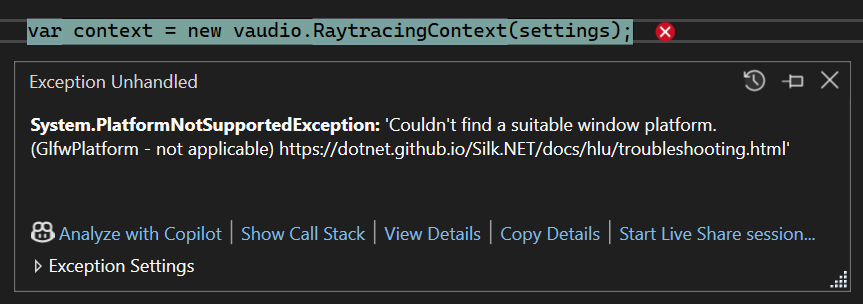
To solve this, copy SDL2.dll and glfw3.dll to your build directory.
Alternatively, add these Silk.NET dependencies to your project via NuGet:
<ItemGroup>
    <PackageReference Include="Silk.NET.Core" Version="2.21.0" />
    <PackageReference Include="Silk.NET.Input" Version="2.21.0" />
    <PackageReference Include="Silk.NET.OpenGL" Version="2.21.0" />
    <PackageReference Include="Silk.NET.Windowing" Version="2.20.0" />
    <PackageReference Include="Silk.NET.Input.Glfw" Version="2.21.0" />
    <PackageReference Include="Silk.NET.Windowing.Glfw" Version="2.21.0" />
    <PackageReference Include="Silk.NET.Windowing.Sdl" Version="2.21.0" />
</ItemGroup>
Missing Resources
When rendering is enabled, you may get this error in the console:
System.IO.DirectoryNotFoundException: Could not find a part of the path '..\projects\testing\bin\Debug\net8.0\resource\cube.vcd'
To solve this, copy the resource folder to your build directory:

Missing Dependencies
When rendering is enabled, you may get this error in the console:
System.TypeInitializationException: The type initializer for 'SkiaSharp.SKImageInfo' threw an exception. ---> System.DllNotFoundException: Unable to load DLL 'libSkiaSharp' or one of its dependencies: The specified module could not be found. (0x8007007E)
To solve this, copy the libHarfBuzzSharp.dll and libSkiaSharp.dll files to your build directory:
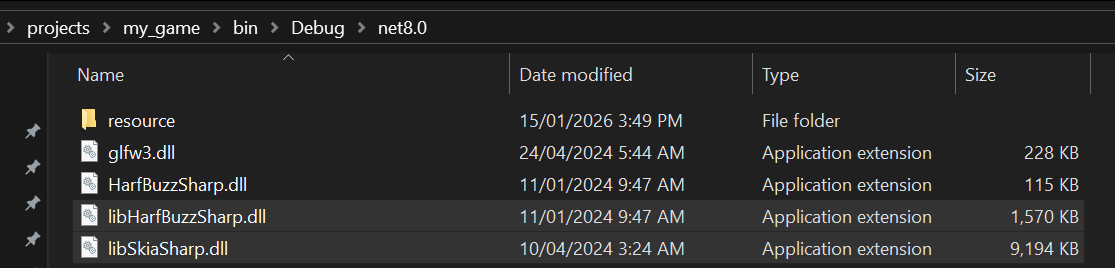
For Godot, these files must also be in the root project directory (where your
godotfile is)
Alternatively, add SkiaSharp v2.88.8 and SkiaSharp.HarfBuzz v2.88.8 to your project via NuGet:
<ItemGroup>
    <PackageReference Include="SkiaSharp" Version="2.88.8" />
    <PackageReference Include="SkiaSharp.HarfBuzz" Version="2.88.8" />
</ItemGroup>